Configuring Destination Options
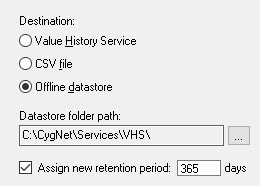
The VHS Import/Export Utility supports three destination types: Value History Service, CSV file, and Offline datastore.
- When using a Value History Service as the destination there are some additional configuration options available. See VHS Destination Option below.
- When using a CSV file as the destination you'll need to specify the location of the CSV file. See VHS CSV File Destination Option below.
- When using an Offline datastore as the destination you'll need to specify the path to the datastore folder. See VHS Offline Datastore Destination Option below.
Importing to a Replicated VHS
The VHS Import/Export utility can be used to import data from a live source VHS to a replicated destination VHS for the purpose of backfilling replication data. This works only when importing from a source VHS; if the source is a CSV file, or an offline datastore, the import will fail. The replicating VHS must be able to communicate with the source VHS across a firewall, subnet, etc.
VHS Destination Option
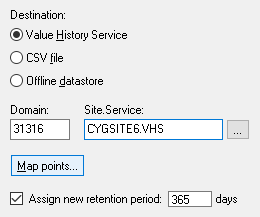
When using a VHS as the destination there are some additional configuration options. These settings are described in detail below.
| Option | Description | |||
|---|---|---|---|---|
|
Domain and Site.Service |
Specify the Site.Service for the destination VHS. If importing to a VHS on a different domain, enter the Domain. |
|
||
|
Map points... |
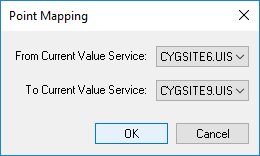
The Point Mapping option can be used to migrate points' Site.Service from one Current Value Service (CVS) to another, by mapping the site and service in the destination VHS from A to B. ExampleTo export a point called EXAMPLE.CVS:POINT1 to a destination VHS, use this feature to map the point to TEST.UIS:POINT1. Without using the mapping, the point would be exported as EXAMPLE.CVS:POINT1. Notes: This option is only available when transferring data from one VHS to another. This option does not work when importing data from a source VHS to a replicated destination VHS. |
|||
|
Assign new retention period: |
The Assign new retention period check box provides a method to change the history retention period for points when they are added to the VHS. This applies only to new points in the VHS. The days field specifies the retention period. See Value History Period for more information about retention time. Notes: Once the PNT resyncs with the UIS/VHS the new retention periods will be overwritten with the value stored in the PNT. This feature will only permanently change the retention time if the points are no longer associated with their PNT. When importing data from a source VHS to a replicated destination VHS, this option only works when creating new points in the destination VHS. |
CSV File Destination Option
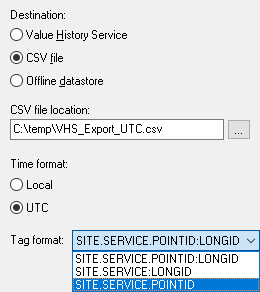
When using a CVS file as the data destination there are some additional configuration options. These settings are described in detail below.
| Option | Description | ||
|---|---|---|---|
|
CSV file location |
Specify the location of the destination CSV file. |
|
|
|
The Time format option specifies how the timestamps will be exported to the CSV file. Options include Local or UTC format. The VHS stores timestamps in UTC time.
Notes About Time Format:
When importing from a CSV file, the utility uses the time format to determine whether the timestamps in the file are in Local or UTC time. If you are preparing your data for later import from a CSV file, it is important to export the data in the right time format. Be careful using Microsoft Excel to review or edit your exported data. If you save the CSV file from Excel, use a cell format that retains the time format. Excel will transform the time format to something the VHS Import/Export utility cannot read when reimporting the data. The import will be successful, but the timestamp will be lost. Alternatively use a program (such as Notepad) to edit the CSV file and not change the time format in any way. See Time Format Notes for the Source option for more information about importing previously-exported data and timestamps. |
|||
|
Tag format |
The Tag format options specify the format the points will be written to file in. Options are:
See Tag String Format for more information. |
Offline Datastore Destination Option
When using an offline datastore as the data destination there are some additional configuration options. These settings are described in detail below.
| Option | Description | ||
|---|---|---|---|
|
Datastore folder location |
Specify the path of the destination datastore folder. Note: If the offline datastore is split (for example, the main datastore file (history.edb) is in one location and the transaction log files (\txlogs) are in another location) the VHS Import Export utility will determine this from the service configuration file. |
|
|
|
Assign new retention period |
The Assign new retention period check box provides a method to change the history retention period for points when they are added to the VHS. This applies only to new points in the VHS. The days field specifies the retention period. See Value History Period for more information about retention time. Notes: Once the PNT resyncs with the UIS/VHS the new retention periods will be overwritten with the value stored in the PNT. This feature will only permanently change the retention time if the points are no longer associated with their PNT. When importing data from a source VHS to a replicated destination VHS, this option only works when creating new points in the destination VHS. |